


Nomad eSIM: Prepaid Data Plan
4.7305.00 Reviews
App Specs
- Version
- 10.16.1
- Updated On
- License
- Free
- Downloads
- 1,000,000+
- Developer
- LotusFlare Inc
- Categories
- Travel & Local
- Platform
- Android, iOS
Screenshots
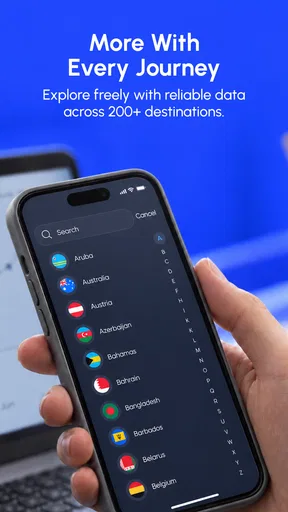
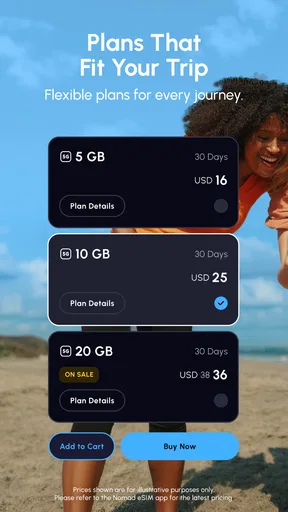
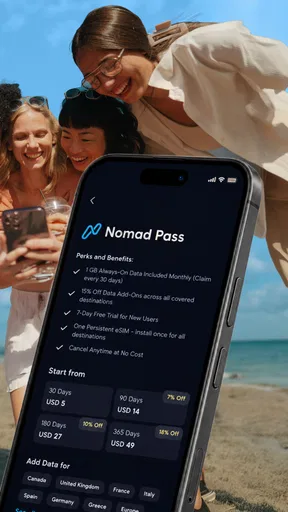
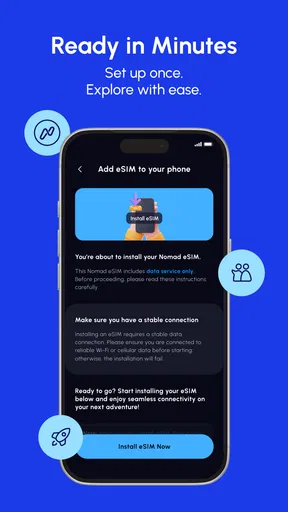
 Analysis by AppCompare
When I travel, mobile data is one of those problems I want to solve before I arrive, not after I am standing outside an airport trying to understand a local phone shop. Nomad eSIM: Prepaid Data Plan takes a direct approach: it lets me arrange travel connectivity through an app instead of swapping a physical SIM card. After using it as a travel and local utility, I found that its biggest appeal is not novelty but reduced friction. I can prepare a connection before a trip, keep my usual SIM available when my phone supports that setup, and avoid treating mobile data as an arrival-day emergency.
That convenience needs a little context. This is a free app in the Travel & Local category, developed by LotusFlare Inc, and its purpose is focused rather than broad. It is not a travel planner, translation tool, map replacement, or general communication suite. Its job is to help me get connected worldwide through a prepaid eSIM plan. That narrow purpose is a strength when I need data quickly, but it also means the app earns its place only when I travel often enough, or when I value preparation enough, to use it repeatedly.
From an easy first setup to a more deliberate travel habit
The first-week appeal is straightforward. I can browse the available travel connectivity options, choose what fits the destination and duration of my trip, and prepare the eSIM before leaving home. That changes the usual arrival routine. Instead of searching for a store, handling a new physical card, and worrying about losing my original SIM, I can make the connection part of my pre-trip checklist alongside boarding passes and accommodation details.
The important distinction is between installing the app and actually being ready to use data. A traveler can download an eSIM app and still arrive unprepared if the plan has not been installed correctly or the phone has not been configured to use it. I would treat the setup as a small technical task, not a one-tap shortcut. Before departure, I would check that the device supports eSIM, confirm that it is not restricted to a single carrier, and read the activation instructions carefully while I still have dependable Wi-Fi.
That preparation is one of the app's less obvious advantages. The airport is a poor place to troubleshoot network settings. I prefer to complete the installation at home, label the travel line clearly in my phone settings, and decide in advance which line handles mobile data. I also keep my primary number available for calls or messages when appropriate, while making sure the travel line is the one selected for data. This workflow is more valuable than simply having another app on my phone because it turns connectivity into something I can arrange calmly.
On a realistic city break, I might land in the morning, use maps to reach a rental apartment, message the host, check a train platform, and look up a restaurant without hunting for a kiosk. The benefit is not that any individual task is unusual. The benefit is that all of them work during the first hour when a traveler is most likely to be tired, distracted, or unfamiliar with local procedures. For me, that is where a prepaid eSIM earns its keep.
It is also useful for trips where buying a local SIM would be inconvenient rather than impossible. A physical SIM can still be a good choice, especially for a long stay or when a local number matters. However, it requires finding a retailer, presenting whatever documentation the carrier requests, changing cards, and storing the original safely. Nomad eSIM avoids that physical handling. I find this especially appealing when I am moving between destinations and do not want a separate card for each stop.
Worth Reading Before You Choose

EA SPORTS FC Mobile 26 Is a Bigger Football Game, but It Takes Time

Flipboard Shows What News Apps Must Do Beyond the Feed

Switching to Android Auto Means Rethinking Your Driving Routine

Google Calendar Makes a Crowded Week Easier to Manage

Ludo King Makes the Most of the Minutes Between Plans

Baby Panda World Brings Quick Play to Modern Phones, but Its Game Library Feels Busy
The app has attracted a strong audience: it has more than a million installs and an average rating of 4.7 from roughly sixteen thousand ratings. Those figures suggest that the basic idea works for many travelers, although they should not replace checking the details of the specific plan and destination. A connectivity app can feel excellent in one country and less convenient in another because coverage, activation behavior, and local network conditions are not identical everywhere.
For a first-time user, the most important question is whether the phone can use the service. I would not wait until the day of travel to answer it. eSIM support varies by device and model, and a compatible phone may still have carrier restrictions. The app is more attractive for someone who already understands those basics or is willing to verify them before purchasing. If I were helping a less technical friend, I would walk them through the phone compatibility check and installation before the trip rather than assuming the process would be self-explanatory.
What makes the first trip feel smoother
The prepaid structure gives me control over the decision. I can think about where I am going and how I normally use data instead of accepting whatever a roaming package happens to include. A light user who mainly needs directions and occasional messages has different needs from someone uploading photos, joining video calls, or streaming during long journeys. The useful habit is to estimate behavior honestly. Choosing a plan based on an idealized low-data trip can create stress later, while choosing far more than needed can reduce the value of the purchase.
I would also download offline maps and essential travel documents before leaving. That may sound like advice against a connectivity app, but it is actually how I get more value from one. Mobile data should be a safety net and a convenience, not the only copy of every important item. Offline preparation reduces data use, protects me in weak-coverage areas, and makes the connection last longer. The app solves access to a network; it does not remove the need for sensible travel preparation.
Another practical tip is to monitor which phone features are consuming data after activation. Automatic photo backups, application updates, and video feeds can use a plan much faster than navigation or messaging. I prefer to leave heavy backups for Wi-Fi and check the travel line's data settings soon after arrival. This is not a special feature of the app, but it is a specific way to avoid blaming the service for usage that comes from the phone's background activity.
Whether it deserves a permanent place on the phone
The month-to-month value depends on how I travel. For an occasional vacation, Nomad eSIM may be a useful tool that I install, use, and then forget until the next trip. That is not a weakness by itself. A travel utility does not need daily engagement to be worthwhile. A smoke alarm is valuable without being used every morning, and travel connectivity can work in a similar way. The question is whether the app makes the next trip easier enough to justify remembering it.
Frequent travelers are more likely to see lasting value. Someone visiting several countries in a year can build a repeatable routine: check destination coverage, compare the available prepaid options, install before departure, select the correct data line, and review usage during the trip. That routine removes several small decisions from future travel. I like products that become boring in this way. Once the setup is familiar, the app stops feeling like a new travel experiment and becomes part of my packing process.
The recurring value is less convincing for people who spend months in one country. In that situation, a local carrier may offer a better long-term arrangement, a local telephone number, or more convenient support for everyday services. A prepaid travel eSIM is designed around mobility and simplicity. It may not be the best foundation for a permanent local connection, particularly if the traveler needs voice calling, local identity verification, or a relationship with a domestic carrier.
Compared with international roaming from my regular carrier, the app offers a different kind of control. Roaming can be simpler because it keeps everything under one existing account, and it may be the better choice for a very short trip when I do not want to configure anything. The trade-off is that roaming terms can be harder to evaluate, especially when usage limits or destination rules vary. Nomad eSIM makes me take responsibility for choosing and activating a separate data plan, but that extra step can make the travel budget and data role clearer.
Compared with buying a physical SIM locally, the app wins on convenience and continuity. I do not need to remove a tiny card, find a shop immediately, or risk misplacing my original SIM. The local SIM can still win on price, local calling, or long-stay practicality. I would choose the physical option when I need a local number or expect to remain in one place long enough for the setup effort to pay off. I would choose Nomad eSIM when speed, preparation, and avoiding physical changes matter more.
There is also a middle ground: some phones can keep a primary line active while using the eSIM for data. That arrangement is convenient, but it deserves careful attention. I would verify which line is selected for mobile data and watch whether calls or messages on the primary line could create roaming charges. The app can provide the travel data connection, but the phone's dual-line behavior still determines the final experience. This is one of the most important trade-offs for travelers who assume installing an eSIM automatically controls every network setting.
The app is free to download, while the practical cost comes from the prepaid plan selected for travel. That distinction matters when comparing it with alternatives. I would compare the actual destination, allowance, duration, and intended usage rather than judging only by the app's download price. A free app does not mean the travel connection itself is free, and the cheapest plan is not necessarily the best value if it creates a need to purchase additional data halfway through a trip.
The maintenance that keeps the convenience intact
Nomad eSIM is relatively light on day-to-day maintenance once the connection is working, but the setup deserves discipline. I would keep the app installed until the trip is complete, retain the relevant activation details, and avoid deleting the eSIM profile simply because I have returned home. Removing a profile too quickly can make a later reactivation more complicated, depending on the plan and phone. I would instead turn the travel line off when I no longer need it and keep my phone's line labels understandable.
Before every new trip, I would check the destination and plan details again rather than assuming an old setup applies automatically. Travel arrangements change, and a plan selected for one country or region should not be treated as universal. I would also confirm the phone's software and network settings while connected to Wi-Fi. The current version is 10.16.1, and the app supports devices running at least OS 9, but compatibility in practice still depends on the phone's eSIM hardware and carrier status.
That maintenance is manageable, yet it is a source of friction for users who want a completely automatic experience. A conventional roaming add-on may feel easier for someone who rarely travels because the existing carrier handles the network relationship. Nomad eSIM asks me to be more involved: I choose the plan, install it, configure the phone, and monitor usage. I see that as a fair trade for flexibility, but it means the app is not equally suitable for every traveler.
Support expectations should be realistic too. Connectivity problems can come from the plan, the local network, the phone's settings, or a mistake in selecting the active data line. I would troubleshoot in that order: check whether the eSIM is enabled, confirm mobile data is assigned to it, verify roaming settings required by the plan, and restart the connection. If the issue is local coverage rather than configuration, changing settings will not magically create a signal. This troubleshooting mindset saves time and prevents unnecessary reinstallation.
Where repeated use can become tiring
The first source of fatigue is choice. Travelers often want one obvious answer, but prepaid connectivity requires comparing destinations, usage habits, travel length, and backup options. The app can simplify the purchase compared with visiting several carrier shops, but it cannot remove the underlying decision. I sometimes find that the convenience is strongest when I already know what I need; it is less effortless when I am uncertain about data consumption or regional coverage.
The second is the psychological burden of watching data. A traveler who normally ignores mobile usage may become cautious after buying a fixed allowance. That can be useful because it prevents waste, but it can also make the phone feel like another trip expense to manage. My solution is to reserve mobile data for active travel needs, use Wi-Fi for large downloads, and keep offline copies of essentials. If I want unrestricted streaming and constant cloud synchronization, a prepaid travel plan may not match my habits.
The third is that an eSIM is not the same as universal coverage. “Worldwide” is appealing as a travel idea, but the quality of the connection still depends on the destination and the networks available there. Remote areas, underground transport, crowded venues, and border regions can produce weak service regardless of how polished the app is. I would use it confidently for ordinary city travel while keeping offline navigation and emergency information available for places where coverage is uncertain.
There can also be a small mental cost when returning home. I need to remember to switch the primary line back for data and check that the travel line is no longer active for ordinary use. That is easy to overlook after a long journey. I consider it a minor task, but it is exactly the kind of task that determines whether a travel utility feels reliable over time. A clear personal checklist is more valuable than relying on memory.
The Everyone content rating makes the app broadly approachable, but technical accessibility is a separate issue. A teenager, older traveler, or anyone unfamiliar with dual-SIM settings may still need help. I would recommend it to a friend who is comfortable following setup instructions, and I would recommend assisted setup for someone who is not. The app can reduce the complexity of buying travel data without eliminating the phone configuration involved.
My long-term verdict for different kinds of travelers
After the novelty fades, I think Nomad eSIM earns lasting space for frequent travelers, short-term visitors who value arriving connected, and people who regularly cross borders. Its strongest quality is repeatable preparation. I can make the connection part of my pre-departure routine, avoid physical SIM handling, and keep my usual number available when my phone supports that arrangement. Those benefits remain useful after the first trip because they address a recurring travel inconvenience.
I would be more selective for a single long stay. If I needed a local number, heavy data every day, or a permanent domestic relationship, I would investigate a local carrier instead. I would also skip this approach if my phone lacks eSIM support, is carrier-restricted, or if I strongly dislike managing separate data settings. In those cases, regular roaming or a physical SIM may be less elegant but more suitable.
My practical recommendation is to install it before the journey, verify compatibility early, activate while on reliable Wi-Fi, label the travel line, and download offline essentials. During the trip, keep an eye on background data and confirm which line is handling mobile data. After returning, disable the travel line and restore the usual data setting. These steps are simple, but they turn a potentially confusing eSIM experience into a dependable routine.
Nomad eSIM is best understood as a prepared travel tool, not a complete replacement for every mobile plan. It does not need to be opened every day to be worthwhile. For me, its lasting value comes from making the stressful first hour in a new place calmer and from offering a repeatable alternative to roaming counters and physical SIM swaps. The app is free, rated for Everyone, and has been available since September 30, 2022, but the real decision is personal: if flexible travel data solves a problem I face more than once, this is a practical app to keep ready.
Pros
- Quick eSIM activation without visiting a store
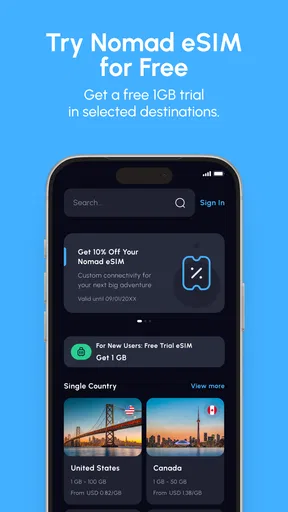
- Plans available for many countries and regions
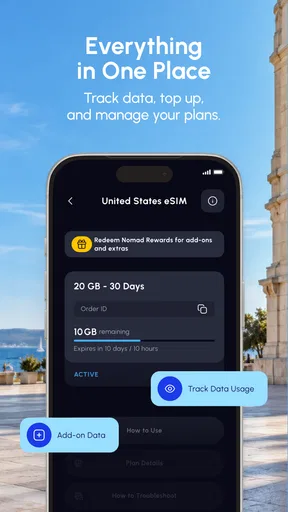
- Useful app for tracking data usage and remaining balance
- Hotspot sharing is supported on many plans
- No physical SIM means less risk of losing your main SIM
Cons
- Your phone must support eSIM and be carrier-unlocked
- Some regional plans can be more expensive than local SIM cards
- Most plans are data-only and lack calls or SMS
- Coverage and speeds depend on the local partner network
- Customer support response times may vary during travel
FAQs for Nomad eSIM: Prepaid Data Plan
What is Nomad eSIM, and how does it work?
Nomad eSIM is a digital SIM service that provides prepaid mobile data plans for travel. Instead of buying and inserting a physical SIM card, you purchase a plan in the app or on the website and install the eSIM on a compatible unlocked phone. Once you arrive at your destination, you activate the plan and connect to a supported local network, depending on the country and plan selected.
Does my phone support Nomad eSIM?
Your device must support eSIM technology and usually needs to be carrier-unlocked for Nomad to work. Most recent iPhones, Google Pixel models, Samsung Galaxy devices, and selected tablets are compatible, but support can vary by region and carrier version. Before purchasing, check Nomad’s compatibility list and confirm that your phone has an available eSIM slot and is not restricted to one network.
Can I use Nomad eSIM for calls and text messages?
Nomad eSIM plans are primarily designed for mobile data, including browsing, navigation, messaging apps, email, and internet-based calls. Most plans do not provide a traditional phone number, standard voice calls, or SMS service. You can still use services such as WhatsApp, FaceTime, Messenger, Skype, or other internet calling applications, provided you have enough data and the relevant accounts configured.
When should I install and activate my Nomad eSIM?
You can generally install the eSIM before traveling while connected to reliable Wi-Fi, which makes setup easier after landing. However, the timing of activation and the validity period depends on the specific plan. Some plans begin when they connect to a supported network, while others may start upon installation. Read the plan conditions carefully and avoid activating it too early if validity is limited.
What happens if I run out of data or experience connection problems?
If your data allowance is used up, you may need to purchase an additional package, top up the existing plan, or buy a new eSIM plan, depending on the destination and Nomad’s available options. For connection issues, check that the eSIM is selected for mobile data, data roaming is enabled for that line, and network selection is set correctly. Restarting the phone and contacting Nomad support can also help resolve setup or network problems.


